Authors note: The sample code in this post will sometimes be modified to be less “correct” in favor of brevity to better convey ideas with less syntactic noise.
Introduction
In the conversations I’ve had about UI, there has been much debate about immediate and retained mode, their differences, and what the “better” paradigm is for different applications. During these discussions, I’ve often seen the term “immediate mode” used to define a very specific kind of UI implementation that doesn’t reflect what is seen in the wild. There are also many misconceptions about what immediate and retained mode even mean and as a result, some false conclusions drawn about the viability of using them in different scenarios. Before we can discuss each paradigm in depth though, we must first learn what each paradigm is and what makes them tick.
Retained Mode
To start, retained mode is the more widely known and recognized of the two paradigms with a very rich history. Many widely used UI toolkits have been made that make use of this style. To name a few:
- QT
- GTK
- WinUI
- The DOM
- Many more…
These toolkits alone power a large portion of graphical software and for good reason: the tooling is very mature, reference material is abundant, and the “object model” is logically very easy to grasp for many people, where a widget maps to an “object” with its own set of properties and actions.
Generally, retained mode APIs follow this style:
| |
This code is lightly modified from this WinUI example.
As you can see, the main idea is that widgets are “objects” in the classical
sense with methods attached to them to perform actions. These objects also have
properties on them that can be set to update the UI at any time. The astute
reader might also notice that myButton_Click doesn’t seem to have anything
that calls it. This is because in this case (WinUI), there is actually a
separate xaml file that holds the following xml:
| |
This file holds information about the button, where it goes on the screen, and how it should interact with the code behind it. In larger teams this offers a nice benefit: the ability to (easily) split layout, styling, and logic at the API level. This allows much of the UI to be defined in a discrete “builder” application where users can drag and drop widgets into their desired locations and configure their visuals without writing a single line of code. This can be extremely powerful when you have a team that has separate designers and programmers as it allows them to work relatively independently of one another.
Another example of this is using the web without any frameworks. Designers can either use their builder applications or directly use HTML and CSS to define a UI while the functionality/logic of the application is then separately defined in Javascript.
Although this separation is a pro in some regards, this isn’t without its drawbacks. For teams that are smaller or more programmer-centric, this can often result in context-switching between UI design and programming, slowing them down overall. In addition to this, the object model can often feel much less direct and results in much more fiddly widget state management as the programmer is now left in charge of managing the various widgets, their internal state, and their lifetimes.
To combat this somewhat, toolkits like QT have begun shifting their recommended APIs towards a declarative approach. This can be seen with QTs QML that looks like:
| |
From the QT Calculator Demo
Here, the widget logic and component code are placed directly next to one another, improving the locality of behavior. However, the model of “object with properties” is still maintained. There also seems to be very little actual application logic contained in the click handler, why is that? Well, the thing is, even with this more contained approach where the description of widgets and their internal logic are placed next to one another, the application or business logic is placed elsewhere. This is a result of a pattern that has commonly emerged in retained-mode UI frameworks called “Model-View-Controller” (MVC).
MVC
Model-view-controller at its core centers around creating an orderly way for graphical applications to interact with and manage their state. Each portion of the pattern has its own role:
- Model: application state
- View: interface the user sees/interacts with
- Controller: code that updates the model upon input from the user
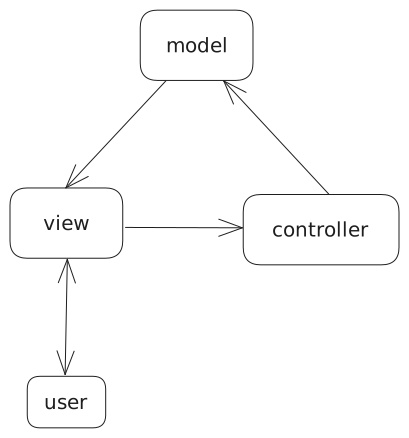
As you can see, MVC follows a circular pattern that maps well to the “event loop” that powers basically every application. One can:
- Read from the model and render the view
- Accept user input from the view
- Perform associated controller actions to update the model
- Repeat ad infinitum
This also adds a number of easy optimization paths since controller actions are discrete events. Using this information, certain steps such as rendering the view can be skipped when no controller actions have been taken, saving power in cases where the application is idle (important for battery-powered devices).
In recent years, a more constrained version of MVC called the Elm Architecture has grown in popularity. At its core, it uses the same principles but applies that to every widget, making a widget into something like the following:
| |
The Button Example from the Elm Docs
The syntax might look a little alien to some but there are some important things to note in this case:
- The view and update logic can reside in the same place
- One doesn’t have to use a traditionally “object oriented” language
- Events are now typed messages that get consumed by the update logic
This leads to a more structured model overall and is reasonably easy for a programmer to write, as the view logic can be laid out in a simple, declarative manner with the side effects being tied to messages with easily identifiable update logic.
There are some “magic” details though that I have been largely overlooking that do make this style of API difficult to implement depending on the language. So far, each of the examples I have shown use some sort of garbage collection and heavy runtime:
- WinUI: C#
- QML: Javascript
- Elm: Compiled to Javascript
QT and WinUI also have official C++ APIs but they make extensive use of destructors which are not part of every language. Those without them then need to manually delete each widget as it goes off-screen. Additionally, these APIs end up splitting up the code again, reducing the locality of behavior to an unpleasant degree. This splitting ends up resulting in a callback-heavy API which makes state management trickier and is overall harder to work with. As a result, alternative solutions need to be explored to reduce the complexity of implementation and usage for those who do not want to use certain language features.
Immediate Mode
I would be remiss to even mention IMGUI without first mentioning the video by Casey Muratori which contains a relatively early formal descriptions of using this technique and can be found here.
The promise of IMGUI is very simple at its core:
| |
The idea is that widgets are simply functions that return values. Although this technique was initially relegated to debug UIs, it found an unlikely champion in the form of the web.
Many “modern” web frameworks build an immediate mode API over the retained mode API of the DOM (this is important for later). React is probably the most well-known example of this with the following example code:
| |
As you can see, a component is quite literally just a function that returns UI to render. This might seem odd at first but it does offer a valuable benefit: the widget hierarchy is a property of the function call stack, meaning that widget lifetimes now don’t have to be managed manually and instead are implicit to the code that you are running. To give an example:
| |
The above code renders a list of elements. Simple enough right? Well what happens if an element is removed from the list? Interestingly enough, there is no need to “delete” the element widget from the list, it simply doesn’t exist the next time the UI code runs.
Another example of this can be seen here:
| |
options_menu is only ever called if render_options_menu is true, meaning that
it only ever renders itself (and any children) when the condition is met. This results
in visibility management of entire component trees being as simple as just… not running
the code for that component.
So where would render_options_menu come from? This is application state right? Well,
the answer depends on what you’re doing. Application state can be broken up into two
categories: widget state and business state. Widget state is state that purely has to do
with an individual widget or component. It has no need to be used by any other component
and simply exists to provide persistent element state. Such state would include: scrollbar
data, certain textbox inputs, and state that only impacts its children elements. This is why
React has useState, it gives the UI programmer a way to contain this local persistent state
to somewhere that isn’t globally accessible. Business state on the other hand gets stored like
one would expect, as a top level struct (global or otherwise). This results in code that looks
like this:
| |
Misconceptions and Solutions
So, now that I’ve roughed out the idea of this API where code is responsible for drawing widgets and listed some potential benefits, it’s time to learn a little about how things work under the hood and address some concerns I have heard about how immediate mode scales. First, one misconception about immediate mode APIs is that the backing implementation can retain zero state. Although this may have been true in the past, most immediate mode frameworks now utilize extensive state retention behind the scenes to enable even basic functionality like hover status. A clear example of this is React, which managed to implement an immediate mode framework over something that was designed explicitly as a retained API. This makes one thing very clear: immediate vs retained mode is almost purely an API decision and the implementations of each style can wildly differ.
Does this mean that immediate mode frameworks should purely implement themselves on top of retained backends then? Not really. Instead, what many toolkit authors have found is that a hybrid approach is instead more desirable, where state is retained for reuse in future frames but the widget tree itself is only maintained for that frame. This often leads to another question: isn’t it expensive to rebuild the widget tree every frame? The short answer is: it depends. The longer answer is, if the application is programmed well, the cost of building the tree and running layout can be measured in microseconds. The more expensive step is instead the rendering of the UI and as such, frameworks that are more immediate in their implementations should instead strive to minimize their number of spurious rerenders.
An example of how to do this can be found in this post by rxi. Although it specifies software rendering, the approach can be expanded to hardware rendering as well.
The next obvious question is then: “how does one program an application well?” The answer here is simple: “do less”. The amount of time spent building the widget tree per frame is directly correlated with the amount of widget code running per frame. The goal here is to minimize the amount of widget code running, especially for widgets that cannot be seen. The most relevant example of this is for long lists. As expected, if a list is many thousands of items long, running UI code for each of those elements will be extremely expensive, especially since most of those elements will never be on screen. Instead, you should virtualize the list, only running the UI code for the subset of widgets you see on screen. This involves creating padding elements that are sized to the layout height of the elements that are not being rendered and dynamically adjusting the sizing of these padding elements as the scroll position changes.
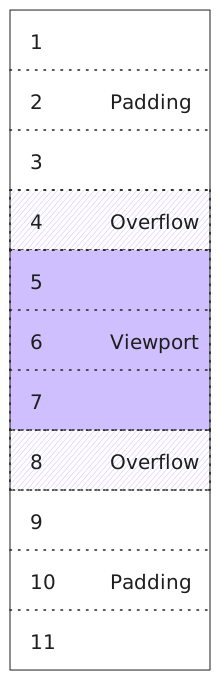
This is something that retained mode applications have to do as well.
This is quite simple for fixed-height list items (of which these are the vast majority) and in cases where line height is variable, some basic basic heuristics of average height will be more than enough to provide reasonable scrolling precision. In practice this looks like:
| |
This was left specific for brevity but making a generic implementation of this is more than possible.
So how is this solved for things that aren’t long lists? Turns out, there aren’t many cases
where there are other bottlenecks. Looking at a standard web application, even one as
featureful as Element, it turns out that there are only ~2400 DOM nodes (when tested via
document.getElementsByTagName('*').length). This can easily be pared down further when we
do basic visibility testing and notice that a substantial number of these nodes come from
off-screen widgets. Regardless, this number of nodes still puts us within our microsecond level
budget of UI build time, leaving plenty of idle time with which to save power.
This does assume a 1-to-1 mapping of DOM node to immediate mode widgets. In practice, I’ve found I can reproduce similar experiences with fewer immediate mode widgets than DOM nodes.
Building the API
So now that we have an idea of how an immediate style api would work and have addressed some of the scaling concerns that are often brought up, how do we get the purported benefits of this style of programming? Well, it turns out to be pretty simple, there are two procedures that everything starts with:
| |
These procedures are the backbone of how immediate mode works. In this case, a widget would follow this structure:
| |
and since we’re using Odin, we can even do a little trick to avoid having to remember to close each element (though this isn’t strictly required):
| |
In this case, an elem is simply a single container/box that gets drawn to the screen
and that can have a variety of different properties set on it. All more complex widgets
(buttons, text boxes, etc.) can be created by combining these elements in various ways
to form the desired on-screen widget.
For example, a very basic button (missing many normal interaction restrictions) would be structured as so:
| |
Notice that widget was trivially formed as a composition of base elements with no special data organization required. It simply emerges from however the widgets are combined together. This is extremely powerful as it gives the consumer of the UI library the same ability to craft custom widgets as the library itself (assuming it offers a set of prebuilt widgets).
So how would we package this up into a reusable component? Well, turns out that’s pretty simple, we just make a procedure:
| |
I would almost never actually have widgets return a
booland would instead prefer returning a bit set holding all actions taken upon them.
This also makes making specific variants of widgets quite simple as a widget like
orange_button can simply be a wrapper around button:
| |
This removes the need to model the domain by class hierarchy and makes specializing components extremely simple.
Let’s go ahead and create the classic counter component now. To start, we likely need four elements:
- Outer “holding” container
- Decrement button
- Text showing the counter value
- Increment button
These four elements would likely look like this in code:
| |
fmt.tprintfprints to a buffer backed by Odin’s temporary allocator, allowing all allocations made on it to be freed in bulk at the end of the frame, extremely useful for transient strings like this.
This is simple overall but there’s one thing “wrong” with this. As it stands, this
component is not reusable since the counter is stored in static memory. This means
that if we packaged this code as-is up into a procedure, it would result in the counter
state being shared across all instances of the component. To get around this, there are
a few options as discussed earlier. In some cases (and potentially this one),
it would make sense to pass the counter by pointer into the component and
operate upon that. The actual value can then be stored in business state:
| |
In other cases, this makes less sense and is where the use_state idea we brought up
earlier would be useful. All that needs to be done is to replace the counter variable
declaration with counter := elem_use_state(0) and update the uses of the counter
variable to indicate that they’re dealing with a pointer now.
This would give us the following code:
| |
As can be seen, we once again have arrived at a relatively declarative API where element declaration and logic are located next to one another. We also still have the freedom to structure our state mutations to be similar to that of the Elm Architecture by having actions push to a dynamic array of events that gets processed separately, this is however, outside the scope of this post.
Conclusion
There are a number of implementation details and other features that I have had to leave out for brevity. Things like animations, implementation of the API, and more. What can be seen though is the ease with which immediate style APIs allow for programmers to build custom components, localize their state mutations, and declaratively specify their UI without using complex language features. This leads to a paradigm that is both powerful, portable, and relatively language agnostic.